MangoWiFi · Wi-Fi 6/7 suite · 802.11bn D2.0 catalog
A Wi-Fi test bench
you run yourself.
One binary, two roles. A Console box drives the run and measures latency; an Agent box sits on the air side as a real station. Between them is the access point you are actually testing.
The lab rig, drawn as it sits on the bench
What you need to buy and cable up to run MangoWifi against a real access point. Stage 1 is the bench you build now; Stage 2 adds the conducted-RF gear the roaming and range tests need.
Stage 1 · build now
One AP, one Wi-Fi client, three wired boxes
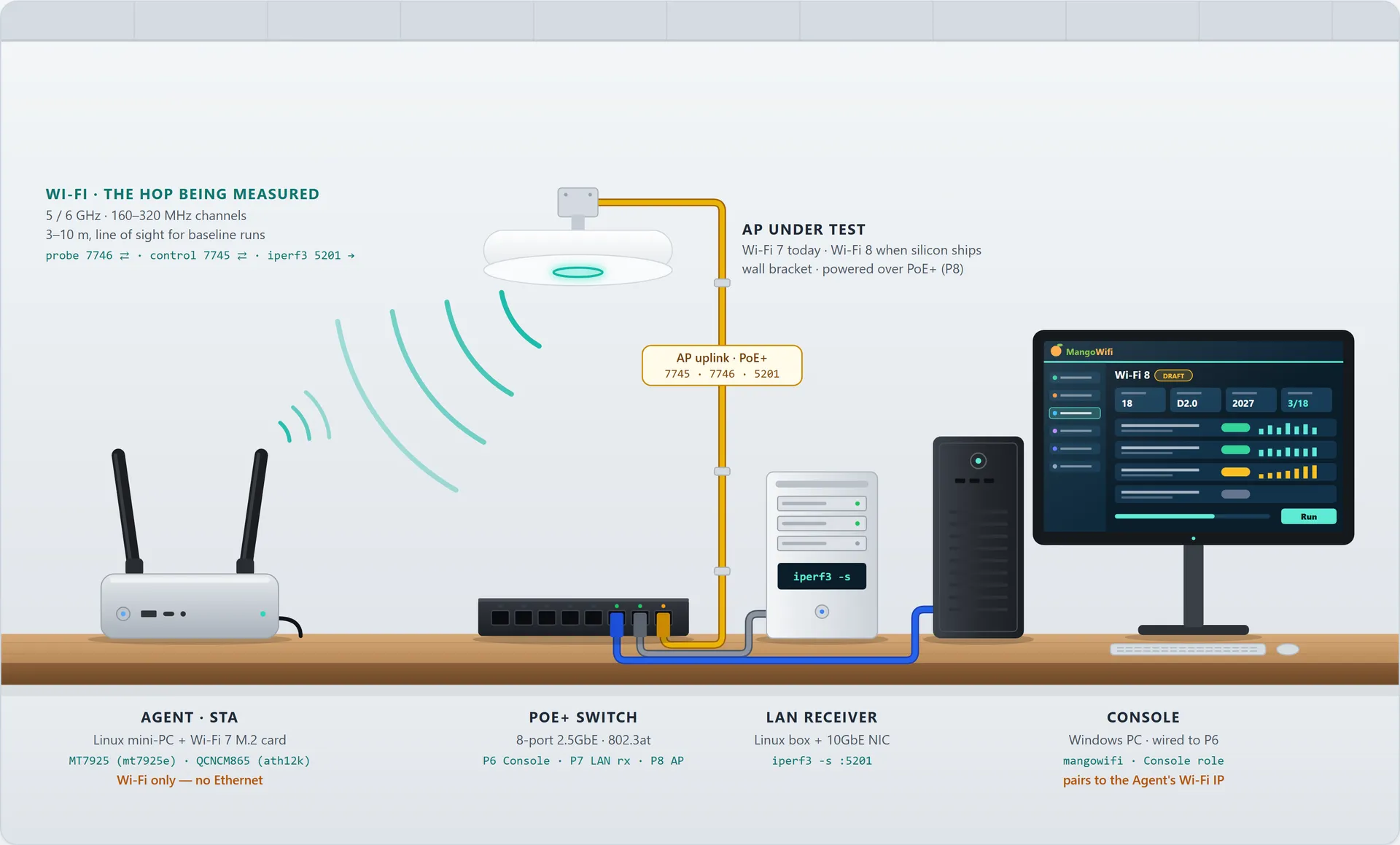
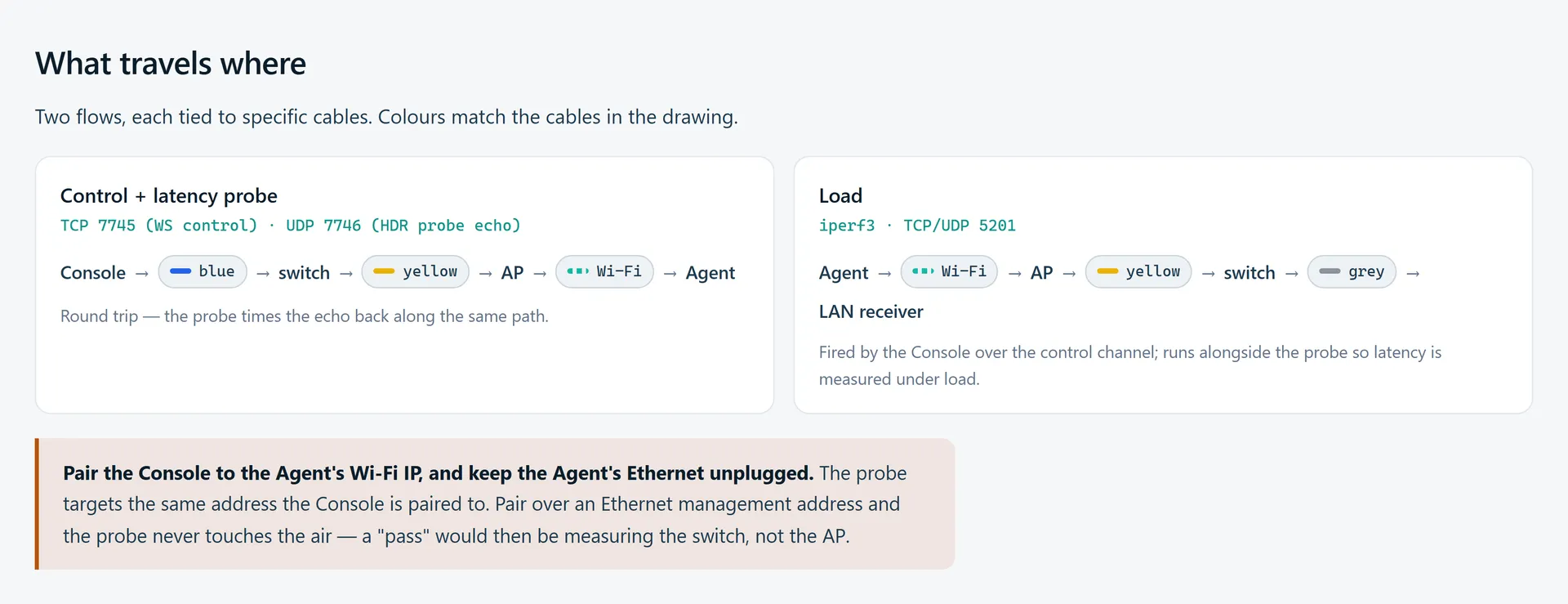
Stage 1. Everything wired lives on the right; the Agent's only link is Wi-Fi. Because the Console pairs to the Agent's Wi-Fi address, the control channel, the latency probe and the Agent's iperf3 load all cross the AP under test — that one air hop is the thing every Wi-Fi 8 runner is measuring.
Stage 2 · roaming & range
Radios in shield boxes, the air replaced by coax
Seamless-roaming and throughput-at-range tests need signal strength you can control. You can't get that repeatably by walking a laptop down a corridor, so the radios move into RF shield boxes and a programmable attenuator sets the path loss.
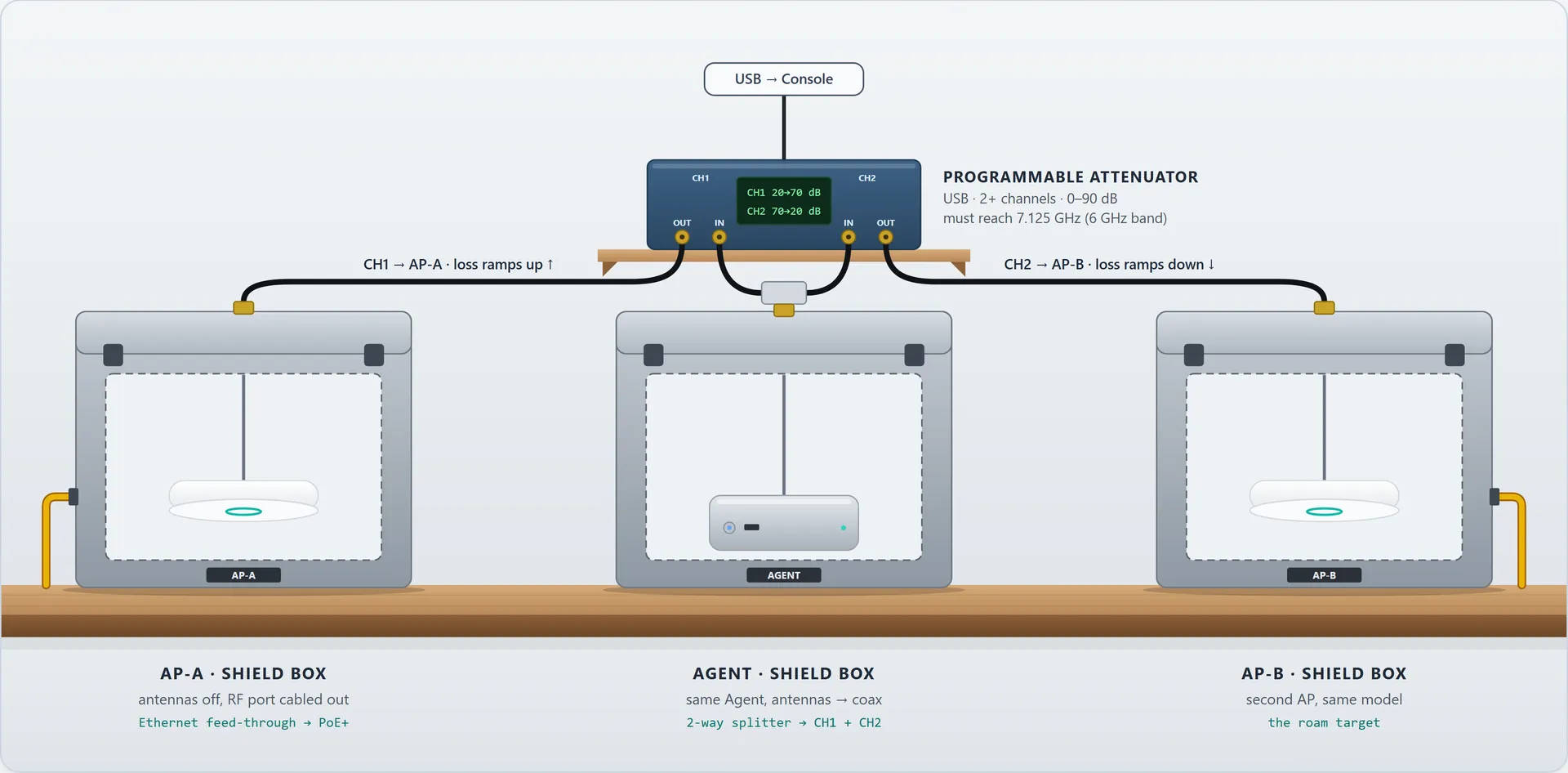
Stage 2. Each radio sits in its own shield box with its antennas replaced by coax, so the only RF path is the cable. The Agent's signal is split and fed through a two-channel programmable attenuator: the Console ramps channel 1 up while channel 2 comes down, the Agent's link to AP-A fades as AP-B's grows, and the roam happens at a known, repeatable point. Drawn as one antenna chain — a 2×2 radio needs two splitters and four attenuator channels.
One binary, two roles
The same executable runs as Console or Agent. Which one it becomes is read from its config file at startup — there is no CLI flag — and the config location comes from MANGOWIFI_DATA_DIR.
- Console — The Tauri 2 desktop UI. Orchestrates the run, fires the latency probe and renders results. Usually wired to the AP's LAN side.
- Agent — Headless on the station side, over the air. WebSocket server on TCP 7745, UDP echo on 7746 — the echo port is always the WebSocket port plus one — and runs iperf3 on demand.
- LAN receiver — A third box on the AP's wired side running iperf3 -s on 5201, so throughput traffic crosses Wi-Fi and then copper instead of looping back.
- Paired by token — Console and Agent share a pair token from config. The target SSID, PSK, band, channel and bandwidth live there too; the PSK is elided from debug output rather than logged.
The measurement, not an estimate
The Wi-Fi 8 reliability work is built on a purpose-written UDP probe rather than on parsing another tool's output. Console sends, Agent echoes, and the round trip crosses the AP under test in both directions.
- 16-byte packets — Each probe carries a little-endian sequence number and a send timestamp in nanoseconds. Sender loop and receiver task run concurrently.
- HDR histogram — Round trips are recorded from 1 µs to 60 s at three significant figures, so the tail is resolved rather than averaged away.
- Every percentile, every run — p50, p95, p99 and p99.9 with mean, min, max, loss ratio, send rate and duration — regardless of which one the test is scored against.
- Bucketed over time — Long runs split into per-bucket histograms indexed by elapsed time. The 30-minute endurance run uses 5-minute buckets, so six points make a trend.
- Drift is a verdict — A run whose later buckets degrade is reported as drifted and warns, instead of passing because the average held.
- Tested on its own terms — Six unit tests cover loopback round-trips, bad parameters, full loss against a dead target, and bucket splitting. Windows' ~15 ms timer floor is budgeted into the assertions rather than ignored.
Inside the console
Captured from the application itself, with the real catalog loaded. No rig is attached, so the app runs its preview path — which is why the radios are chipped MOCK and the checks read as not yet run. Click any shot to read it full size.
1 / 10
Four sections, one catalog
Every test is one struct in a single catalog, tagged with the section it belongs to and the clause it traces back to.
Baseline
Live
Twenty-four pre-flight checks across environment, radio, station, RF, AP and traffic. Is the kernel new enough, is the radio bound, does the AP appear in a scan, does iperf3 exist.
Criteria
Live
Per-metric rows in the shape commercial suites use — basic, TCP, UDP, RFC 2544, range, capacity, roaming, application and backwards compatibility.
Wi-Fi 8
3 of 18 live
Draft 802.11bn D2.0 (July 2026) across MAPC, Enhanced MLO, Seamless Roaming, Reliability and Power. The three live rows are all Reliability KPIs.
WFA
Catalogued
Wi-Fi Alliance certification-aligned rows — Wi-Fi 6/6E/7, Vantage, Voice-Enterprise, WPA3. Each carries a coverage rating; the runners are not written.
Three Wi-Fi 8 KPIs that run today
All three are UHR Reliability rows. Each scores against one percentile and reports the rest, and each states whether the concurrent load actually ran — so an unloaded pass is never mistaken for a UHR result.
p95 latency floor
WFA UHR KPI — p95 ≤ 5 ms (AI/XR target)
wifi8_rel_p95_latency200 packets per second for 30 seconds, with udp_high_load fired once on the Agent alongside it. Passes at p95 ≤ 5 ms, warns to 10 ms; loss passes at 0.1% and warns to 1%.
30-minute endurance with drift
WFA UHR KPI — p95 ≤ 5 ms held across the window
wifi8_rel_stress_enduranceThe same thresholds over 30 minutes, with the load cycled continuously rather than fired once — a single iperf3 pass is 15–30 seconds and would leave most of the window idle. Split into six 5-minute buckets so drift is visible as a trend.
p99.9 tail
UHR AR/XR aspirational — p99.9 ≤ 10 ms
wifi8_rel_p999_latency30 minutes at 200 pps, scored on p99.9: passes at 10 ms, warns to 20 ms. The project is explicit that 360,000 samples put roughly 360 in the top 0.1% — directional, not certification-grade, which would want about a million.
The Wi-Fi 8 catalog in full
Draft 802.11bn D2.0, dated July 2026. Eighteen rows across five categories, each carrying the clause it tests against. Three execute today; the rest are inventory with a spec reference and no runner, which is what makes the gap auditable.
MAPC — Multi-AP Coordination
802.11bn D2.0 §35.14- CataloguedCoordinated Beamforming
§35.14 (Co-BF)
Two coordinated APs null-steer toward each other's clients; measures SINR uplift and MPDU-loss reduction against an uncoordinated baseline.
- CataloguedCoordinated Spatial Reuse
§35.14 (Co-SR)
Co-SR transmit-power negotiation between overlapping BSSes, verifying per-AP adjustments and reduced interference on a shared channel.
- CataloguedCoordinated TDMA
§35.14 (Co-TDMA)
Two APs share airtime on one channel via a negotiated schedule; verifies the split is honoured and no schedule collisions occur.
- CataloguedNon-Primary Channel Access
§35.14 (NPCA)
Access on a non-primary channel while the primary is busy.
Enhanced MLO
802.11bn D2.0 §35.3- CataloguedDynamic link add
§35.3 (MLO extensions)
A link is added to a running multi-link association without tearing it down.
- CataloguedDynamic link remove
§35.3 (MLO extensions)
A link is removed while traffic continues on the others.
- CataloguedLink failure recovery
§35.3 (MLO failover)
One link is killed; the association survives on the remainder and recovers.
- CataloguedCross-AP link binding
§35.3 + §35.14 (MLO+MAPC)
Links bound across two coordinated APs — the point where MLO and MAPC meet.
Seamless Roaming
802.11bn D2.0 §35.11- CataloguedState carryover
§35.11 (Seamless Roaming)
Session state survives the handoff rather than being rebuilt.
- CataloguedMPDU-loss boundary
§35.11 + WFA UHR KPI
How many frames are lost at the moment of transition.
- CataloguedRe-auth latency
§35.11 (roam timing)
Time to re-authenticate on the new AP.
- CataloguedSticky-client prevention
§35.11 (STA-side roam trigger)
The station leaves a weakening AP instead of clinging to it.
Reliability
802.11bn D2.0 WFA UHR KPIs- Runsp95 latency floor
WFA UHR KPI — p95 ≤ 5 ms (AI/XR target)
Console-side probe under concurrent Agent load, scored on p95.
- Runs30 min endurance + drift
WFA UHR KPI — p95 held across the window
The same thresholds over 30 minutes in 5-minute buckets, with the load cycled.
- Runsp99.9 tail
UHR AR/XR aspirational — p99.9 ≤ 10 ms
Tail-focused single window; the frame a headset drops, not the typical one.
- CataloguedThroughput at range
WFA UHR KPI — ≥25% uplift at range
Throughput uplift at distance against a prior-generation baseline.
Power
802.11bn D2.0 §35.9- CataloguedEnhanced TWT negotiation
§35.9 (TWT extensions)
Target Wake Time negotiation under the extended rules.
- CataloguedLow-latency doze
§35.9 (low-latency doze)
Sleep behaviour that does not cost the latency budget.
Aligned, not certified
These tests mirror the behaviours in Wi-Fi Alliance certification test plans, so you can shake out issues in-house before submitting to an accredited lab. MangoWiFi is not an Authorized Test Lab — a passing run here does not issue a Wi-Fi CERTIFIED™ mark.
Accredited labs: DEKRA · Element · Sporton · UL
Deliberately out of scope
- RF conformance — EVM, spurious emissions, EIRP and TX mask need a chamber and a vector signal analyser. Genuinely out of scope rather than merely unimplemented.
- Wi-Fi Direct, Aware, EasyMesh, Passpoint — Peer-to-peer, mesh and hotspot programmes are a different story from AP performance testing.
- Matter, MFi CarPlay, PTCRB — Different programme families needing formal lab status this project will not hold.
- HaLow (802.11ah) — Sub-1 GHz silicon. The MT7925 does not cover it.
Three rigs, two of them real
The same build runs on one laptop for development and on a two-box bench for real measurement. The third arrangement is described because it is designed, not because it exists.
Works today
A · Dev loopback
One machine, no access point. Console and Agent on the same box, measuring sub-millisecond loopback — which verifies the wiring, not the radio.
The target
B · Real lab
Two boxes and the AP under test, plus a LAN receiver on its wired side. The probe crosses the air both ways; throughput crosses air then copper.
Needs hardware
C · Not yet built
A programmable attenuator for roaming, a multi-AP cluster for MAPC, Wi-Fi 8 station silicon for Enhanced MLO, and optionally an RF chamber.
Pricing
Try it against mock radios. Pay when it meets real ones.
The console runs on its own with simulated radios, which is enough to see the catalogue, the runners and the reports. Measuring a real access point is what the paid editions are for.
Free to try
The whole console, with mock radios.
$0preview modeDownload- The full Wi-Fi 6/7 catalogue and the 802.11bn D2.0 draft rows
- Every test definition, with its spec reference and thresholds
- Preview runs against simulated radios, chipped MOCK throughout
- Reports and the results view
Developers
For one engineer with a bench.
Talk to usContact sales- Everything in Free to try, against real hardware
- The Agent on a real station, over the air
- The UDP latency probe, with HDR histograms and every percentile
- The three live Wi-Fi 8 reliability runners, including the 30-minute endurance run
- Baseline pre-flight checks against your own rig
Teams
For a lab with more than one rig.
Talk to usContact sales- Everything in Developers, across several rigs
- Shared results and run history
- Scheduled and unattended runs
- Conducted-RF setups: shield boxes and programmable attenuators
- Support for building the bench
MangoWiFi is not an Authorized Test Lab, and a passing run issues no Wi-Fi CERTIFIED™ mark. That is true on every tier.
Download
No account and nothing phoning home. Every release publishes checksums beside it.
Console and Agent
One binary, two roles. The Console runs anywhere; the Agent needs Linux with kernel 6.7 or newer, because that is where the radio work happens.
Verify a download against SHA256SUMS for 0.1.0.
Windows and macOS will warn you the first time. These builds are not code-signed yet, so both show their unknown-developer dialog on first launch. Code signing is in progress. Until it lands, the SHA-256 checksums published with every release are how you confirm the file you have is the file we built.
Windows · SmartScreen
- If the browser flags the download itself, choose Keep.
- Run the installer. A blue “Windows protected your PC” dialog appears.
- Click More info, then Run anyway.
macOS · Gatekeeper
- Open the .dmg and drag the app into Applications.
- Launch it once. macOS refuses, saying the developer cannot be verified.
- Open System Settings → Privacy & Security and scroll to Security. The blocked app is named there, with an Open Anyway button.
- Click it, then confirm with Open. On macOS 14 and earlier you can instead Control-click the app and choose Open.
What is shippable today
Taken from the project's own scope statement rather than softened for a product page.
Ready for a lab bench
- Wi-Fi 6/7 Baseline and Criteria
- Wi-Fi 8 Reliability: p95 latency under load
- Wi-Fi 8 Reliability: 30-minute endurance with drift analysis
- Wi-Fi 8 Reliability: p99.9 tail latency
Needs hardware first
- MAPC rows — a multi-AP cluster
- Enhanced MLO rows — real Wi-Fi 8 station silicon
- Seamless Roaming rows — a programmable attenuator
Not in the box
- Certification-grade PHY measurement — chamber gear and a vector signal analyser
- A co-located echo responder on the LAN receiver, which would let Agent-side tests capture p95 too